Product
arrow
Pricing
arrow
Resource
arrow
Use Cases
arrow
Locations
arrow
Help Center
arrow
Program
arrow
WhatsApp
WhatsApp
WhatsApp
Email
Email
Enterprise Service
Enterprise Service
menu
WhatsApp
WhatsApp
Email
Email
Enterprise Service
Enterprise Service
Submit
pyproxy Basic information
pyproxy Waiting for a reply
Your form has been submitted. We'll contact you in 24 hours.
Close
Home/ Blog/ How to send a GET request via Curl? Mastering the core techniques of efficient API calls.

How to send a GET request via Curl? Mastering the core techniques of efficient API calls.

PYPROXY PYPROXY · Oct 30, 2025

how-to-send-a-get-request-via-curl.jpg

In a data-driven technology ecosystem, Curl's core position as a command-line tool has never wavered. Its concise syntax and cross-platform compatibility make it the preferred tool for developers to test APIs and debug interfaces. Sending a GET request via Curl is essentially initiating an HTTP protocol data retrieval operation to the target server, commonly used to read resource information or trigger actions without side effects. For scenarios requiring handling cross-border requests or circumventing IP restrictions, combining it with PYPROXY's proxy IP service can significantly improve request success rates and security.


Basic understanding of Curl tools and the principles of GET requests

Curl (Client URL) supports dozens of protocols, including HTTP, HTTPS, and FTP, and its core value lies in three aspects:

Protocol compatibility : Covers mainstream network communication standards and adapts to different development environment requirements.

Ease of debugging : Quickly modify request headers, timeout settings, and other details via command-line parameters.

Automated integration: Seamlessly integrates with scripting languages (such as Bash and Python), supporting batch tasks.

As the most basic method of HTTP, the GET request has the following characteristics:

Data is passed via URL parameters (e.g., ?key1=value1&key2=value2).

The request result can be cached, and there is no risk of modifying server resources.

The default maximum URL length limit (usually 2048 characters)


Complete operation process of sending a Curl Get request

Basic command construction

The standard GET request format is:

curl -X GET "https://api.example.com/data"

The -X parameter explicitly declares the request method (it can be omitted, as Get is the default method).

Parameter passing and encoding

URLs containing special characters (such as spaces or Chinese characters) must be URL encoded.

curl "https://api.example.com/search?query=%E4%BB%A3%E7%90%86IP"

Alternatively, use the `--data-urlencode` parameter for automatic processing:

curl -G --data-urlencode "query=proxyIP" "https://api.example.com/search"

Response header and status code parsing

Adding the -i parameter will retrieve the complete response header information, which can be used to debug issues such as authentication failure (401) and rate limiting (429):

curl -i "https://api.example.com/status"

Integration and invocation of proxy IPs

Specify the proxy server using the -x or --proxy parameter, for example, to use PYPROXY's Socks5 proxy:

curl -x socks5h://user:pass@proxy.pyproxy.com:1080 "https://api.geolocation.com"

This configuration is particularly suitable for scenarios that require simulating access to specific regions.


Common problems and solutions for GET requests

SSL certificate verification failed: Add the -k or --insecure parameter to skip verification (test environment only).

Response data garbled: Use -H "Accept-Encoding: gzip" to explicitly specify the encoding format, or convert the character set using iconv.

Connection timeout control: Set --connect-timeout 10 (10-second connection timeout) and --max-time 30 (overall timeout).

Large file download interrupted: Implement resume download by combining the -C - parameter


Performance optimization strategy

Accelerating concurrent requests

Implement multi-process concurrency using xargs (example: initiating 5 requests simultaneously):

cat urls.txt | xargs -n1 -P5 curl -s -o /dev/null

Request Link Analysis

Use the `--trace-time` and `--trace-ascii` parameters to record detailed timestamps and communication logs to pinpoint network latency bottlenecks:

curl --trace-ascii debug.log --trace-time "https://slow.api"

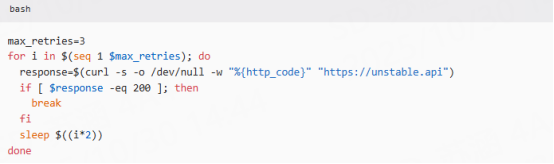
Automated retry mechanism

Write a shell script to implement exception status code detection and retry (example for 503 error):

image.png 


Value in URL Request

Anti-crawler measures: Utilize PYPROXY dynamic ISP proxy to rotate IPs and avoid triggering frequency limits on target websites.

Geofencing : Using residential proxy IPs to simulate local users accessing region-restricted content (such as streaming media copyright libraries).

Load balancing test: Assign proxy IPs from different data centers to verify the response consistency of CDN nodes.


PYPROXY, a professional proxy IP service provider, offers a variety of high-quality proxy IP products, including residential proxy IPs, dedicated data center proxies, static ISP proxies, and dynamic ISP proxies. Proxy solutions include dynamic proxies, static proxies, and Socks5 proxies, suitable for various application scenarios. If you are looking for a reliable proxy IP service, please visit the PYPROXY website for more details.


Related Posts

Clicky